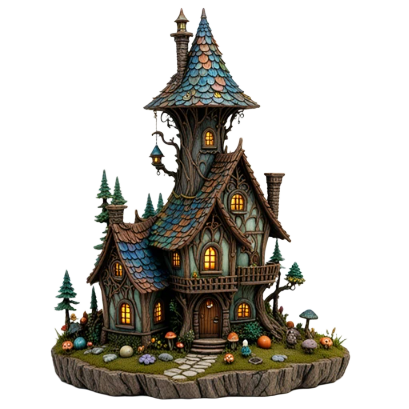
 REFERENCE IMAGE1024 / 1536
01 / GENERATE
One image. A textured 3D model.
Photos, illustrations, characters, objects. Choose standard or high detail and let image-to-3D build the shape and texture.
Create from an imageTHE AI 3D CREATION STUDIO EARLY ACCESS
Turn a photo or illustration into a textured 3D model. Shape it for your digital world. Prepare it for your real one.
JPG, PNG or WebP · up to 10 MB
AI generation included in proposed monthly plans · Explore pricing
Interactive sample · not an AI generation
Drag to orbit · Scroll to zoomTwo fingers to orbit & zoom · Try the views above
YOUR CREATIVE TOOLKIT
Go from a flat reference to a model you can
inspect, adapt, share, and take anywhere.
REFERENCE IMAGE1024 / 1536Photos, illustrations, characters, objects. Choose standard or high detail and let image-to-3D build the shape and texture.
Create from an imageAsk Pixi to change a material colour, edit your reference photo, add a skeleton or prepare an export. Review the proposed action and keep control of every saved change.
Meet Pixi in your studioOrbit freely. Compare texture, clay and wireframe. Check all sides, then adjust size and orientation with a clear view.
Try the 3D viewerPick a colour or ask Pixi. Try matte, satin or metallic finishes, compare the result, undo changes and save a new GLB version.
Try the colour editorTake your model to Blender, Unreal, Unity or Godot using standard formats. Download saved colour and rigged GLBs, or share a file with a 15-minute link.
Explore the formatsSet the height, rotate the model, add an optional base and create a checked STL. Print it yourself or request a quote.
Explore the print workflowGeneration, Pixi guidance, inspection, export and print preparation belong in one service. Early-access creation is currently by invitation. Processing runs in the background, with progress saved to your account.
CHOOSE WHERE IT GOES NEXT
Portraits, collectibles, decorative objects. Take the model through a print preparation workflow before bringing it into your slicer.
Inspect the result, then check scale, layers and supports in your slicer. Geometry checks cannot guarantee a successful print.
One clear subject, in full view.
Inspect clay. Set size and orientation.
Review surface checks and all sides.
Import your STL into Bambu Studio or your preferred slicer. Choose material, layers and supports.
Generate props and scene assets from your images. Choose the size, texture budget and format for your next tool.
Download GLB for Blender or Godot. Choose the original, saved colours or rigged model for export. Use FBX for Unreal or Unity, or USDZ for Apple AR; GLB and glTF also preserve skeletons. Review scale, materials and skin weights in your tool; animation clips and native project files are separate.
WHAT WILL YOU CREATE?
Start with a photo, an illustration, or a sketch.
Explore the possibilities of your own reference.
Creative references & concept artwork. AI infers unseen surfaces; every generated model needs visual review.
ONE CONNECTED WORKSPACE
Your reference, models, versions and notes belong together. Leave while a job processes. Return to the progress you saved.
Sign in with Google or email. Redeem your invitation code, then choose an image and let us generate your textured 3D model.
Need an invitation? Request access.
WE CREATE THE 3D FOR YOU
A monthly allowance for turning photos and illustrations into textured 3D models. The same connected studio in every plan.
Plan preview · Paid subscriptions are coming soon. These are proposed launch prices and allowances. You can explore a plan now; no payment is collected. Studio creation currently requires an early-access invitation.
Explore our upcoming monthly plans. Contact us about early access.
Simple generation creditsProposed usage: Standard costs 10 credits; High detail costs 20. Choose either, or mix both within your monthly allowance.
Your whole creation workflowAll proposed plans include Pixi guidance, private projects, model inspection, saved versions and the available print and digital export tools.
Physical prints are separateBring your generated model to Bambu Studio, or request a physical-print quote. Materials, production and shipping are quoted separately.
GOOD TO KNOW
We generate a textured model from your photo or illustration. Edit material colours and finishes with Pixi or manual controls, save colour versions, add an optional skeleton, inspect your model and prepare checked STL files. Original and coloured models export as GLB, glTF, OBJ, PLY, FBX or USDZ. Rigged models use GLB, glTF, FBX or USDZ to retain the skeleton.
Use one sharp, well-lit subject with space around its edges. Keep the full shape visible and choose a simple background. Blur, overlapping subjects and cropped limbs make reconstruction harder. JPG, PNG and WebP are supported up to 10 MB; export HEIC as JPG first.
No. Start with a photo or illustration, or choose one of our concept references. We generate the textured 3D model for you. Pixi guides your next steps, and you can inspect, export or prepare the result for printing in the same studio.
Our proposed plans are Starter ($19 USD/month, 200 credits), Creator ($39 USD/month, 600 credits) and Studio ($79 USD/month, 1,500 credits). Paid subscriptions are not open yet, and selecting a preview does not subscribe or charge you. Early access currently uses invitation codes. Final billing, credit renewal and cancellation terms will be shown before subscriptions open.
Your image waits for an available GPU worker, then generates a model and prepares its STL. Queue and processing times vary. Standard detail uses 1024 resolution; high detail uses 1536 and takes longer. You can leave the page and return to your saved progress.
Use GLB for a single textured file, or glTF for separate files in a ZIP. OBJ exports include an MTL and base-colour texture in a ZIP. PLY contains geometry only. Choose FBX for Unreal or Unity, or USDZ for Apple AR workflows. Select your original, saved colour version or rigged model before exporting. STL is the shape for your slicer. You can keep your original and download saved export versions.
Create a textured 3D model from an image, change its material colours, and add an optional skeleton for posing in Blender or another compatible tool. Pixi helps you preview edits and prepare actions. Text-to-3D, region-based AI retexturing and animation generation are not yet available.
One image cannot show every surface. AI infers the hidden shape, so likeness and fine details vary. Inspect clay view and the STL, then check sliced layers, scale and supports before printing. Failed geometry checks are clearly marked for review.
Projects are private to your account. You can create a file link that expires after 15 minutes; anyone with that link can download it during that time. GLB previews can open in Android Scene Viewer on compatible devices. Models can also export as USDZ for compatible Apple AR tools. Review the file on your target device; there is no built-in iPhone AR launch button yet.
FROM A FLAT IMAGE TO WHAT’S NEXT
Invitation access · Your projects, privately saved